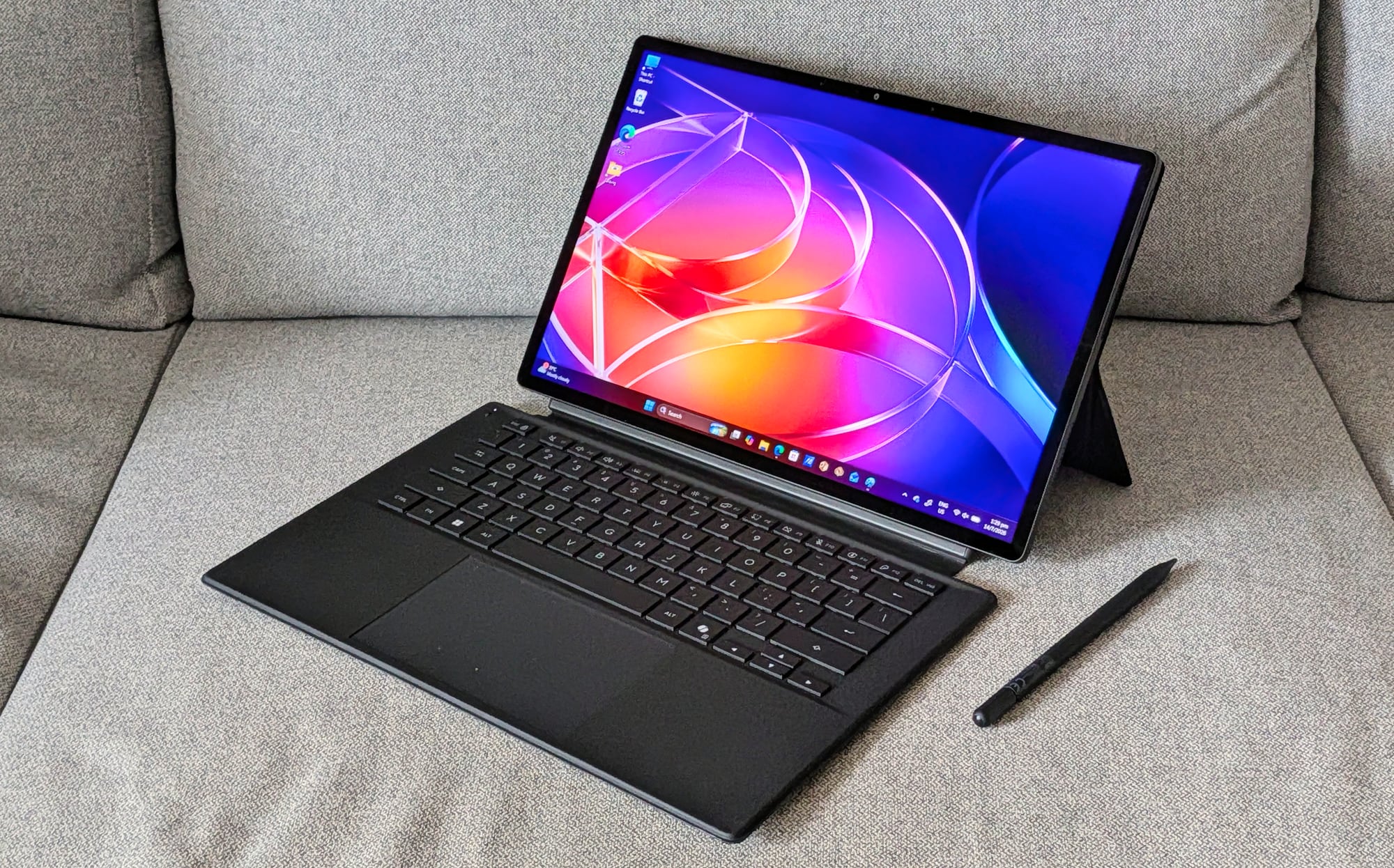
Since forever, content creators, photographers, and illustrators always have a dilemma in choose a traditional, heavyweight laptop with a discrete GPU, or the featherweight portability of a under-powered tablet. With the launch of the Asus ProArt PZ14 (HT7407), Asus is making a bold play to eliminate that compromise entirely.
- Price: S$4,499, get it at ASUS Online Store
- Processor: Qualcomm Snapdragon X2 Elite (X2E-88-100), 18-core
- NPU: Qualcomm Hexagon (Up to 80 TOPS AI processing)
- Graphics: Qualcomm Adreno X2-90 Integrated
- Display: 14.0-inch 3K (2,880 x 1,800 pixels) Lumina Pro OLED, 16:10, 144Hz
- Memory / Storage: 32GB LPDDR5X / 1TB M.2 NVMe PCIe 4.0 SSD
- Weight: 0.79 kg (Tablet only)
- Connectivity: 2x USB Type-C, SD Express 7.0 Card Reader, Wi-Fi 7
| PROS | CONS |
| Great overall performance | Expensive |
| Works superbly as both tablet and laptop | Detachable keyboard’s key a tad cramped |
| Slim and lightweight | Only two USB-C ports |
| Bright and vivid display | |
| Good battery life |
Combining Qualcomm’s brand-new second-generation Snapdragon X2 Elite silicon with their renowned Lumina OLED displays, this 14-inch detachable 2-in-1 is built explicitly for creative professionals who treat the world as their office. But can a 9mm-thin Windows tablet truly shoulder heavy creative workloads, or does its hybrid form factor trip it up? Let’s find out.

The very first thing you notice when unboxing the ProArt PZ14 is just how incredibly slim it feels. At a mere 9mm thick (which I have trouble photographing) and tipping the scales at just 0.79 kg for the tablet alone, it slips into a backpack almost unnoticed.
Asus has treated the aluminium chassis with a sleek “Nano Black” anodised finish. Not only does it give the machine a stealthy, premium look, but it uses an active silane resin coating that legitimately repels fingerprint smudges. A massive plus for a device meant to be handled constantly. Despite its thin profile, it boasts military-grade durability and an IP52 rating, meaning it can withstand the occasional dust patch or accidental splash during outdoor shoots.

The box comes generously packed with the magnetic stand cover, a detachable Bluetooth keyboard with a precision trackpad, and the ASUS Pen 3.0 stylus. You can seamlessly transition from editing a photo series in Laptop Mode to sketching out concepts or illustrations freely in Tablet Mode. I might not be an artist, but sketching with the stylus is as smooth as silk on the display.
If there is a crown jewel on the PZ14, it is unequivocally the display. Asus has packed a gorgeous 14-inch, 3K (2,880 x 1,800 pixels) Lumina Pro OLED touchscreen into the frame. For photojournalists and graphic designers, colour accuracy is of paramount importance, and this screen hits it out of the park. It covers 98% of the DCI-P3 colour gamut, is PANTONE validated, and delivers an incredible 1,000 nits of peak HDR brightness.

Working under the harsh afternoon glare at a local café is no issue at all, thanks to an effective anti-reflective coating. Furthermore, the display’s smooth 144Hz variable refresh rate makes scrolling, sketching, and scrubbing through timelines feel incredibly responsive.
Under the hood lies Qualcomm’s next-gen ARM architecture—the 18-core Snapdragon X2 Elite chip. Paired with a massive 32GB of RAM, this processor handles daily productivity tasks with zero hesitation.

On paper, the 2-in-1’s Hexagon NPU pushes a massive 80 TOPS of AI performance, opening up efficient on-device capabilities. In apps like Adobe Photoshop and Lightroom, complex tasks like subject masking or generative fills happen almost instantly. Great for content creators or photographers working on the go.

Thermal management is handled by a single-fan chassis equipped with a smart 0 dB ambient cooling mode. During light photo organisation or document editing, the device runs completely silent. Even under heavier image processing loads, fan noise remains remarkably quiet.
Battery life is another massive win. The integrated 75Wh battery comfortably sailed through roughly 13 hours of continuous real-world creative use, meaning you can confidently leave the 68W USB-C charger at home for day trips.

No device is entirely perfect, and the PZ14’s biggest compromise stems from its hybrid nature. Because the keyboard attaches via a flat magnetic connector rather than a rigid physical hinge, typing on your lap can feel awkward and unstable.
The keyboard needs to sit completely flat on surfaces (not ideal for your lap), and the keys – while tactile with 1.7mm travel – can feel slightly cramped if you are typing long articles all day. While Windows 11 has made major strides in touchscreen optimisation, it still occasionally feels clunky to navigate solely with fingers compared to iPadOS.

Port selection is also minimal due to the thin chassis: you get two USB4 Type-C ports and an SD Express 7.0 card reader. While the SD reader is a massive boon for photographers transferring RAW files on the go, you will still need a dongle if you rely heavily on legacy USB-A gear.
VERDICT: The Asus ProArt PZ14 (HT7407) is a beautifully realised piece of hardware that showcases exactly where the future of mobile creation is heading. At S$4,499, it is undeniably a premium investment tool.
If you are a writer or an office executive who needs to type thousands of words a day on a lap, a traditional laptop might suit you better. However, if you are an artist, photographer, or visual creator looking for an incredibly bright, highly accurate digital canvas that packs desktop-grade AI muscle into a sub-1kg frame, the ASUS ProArt PZ14 stands out as a phenomenal companion.