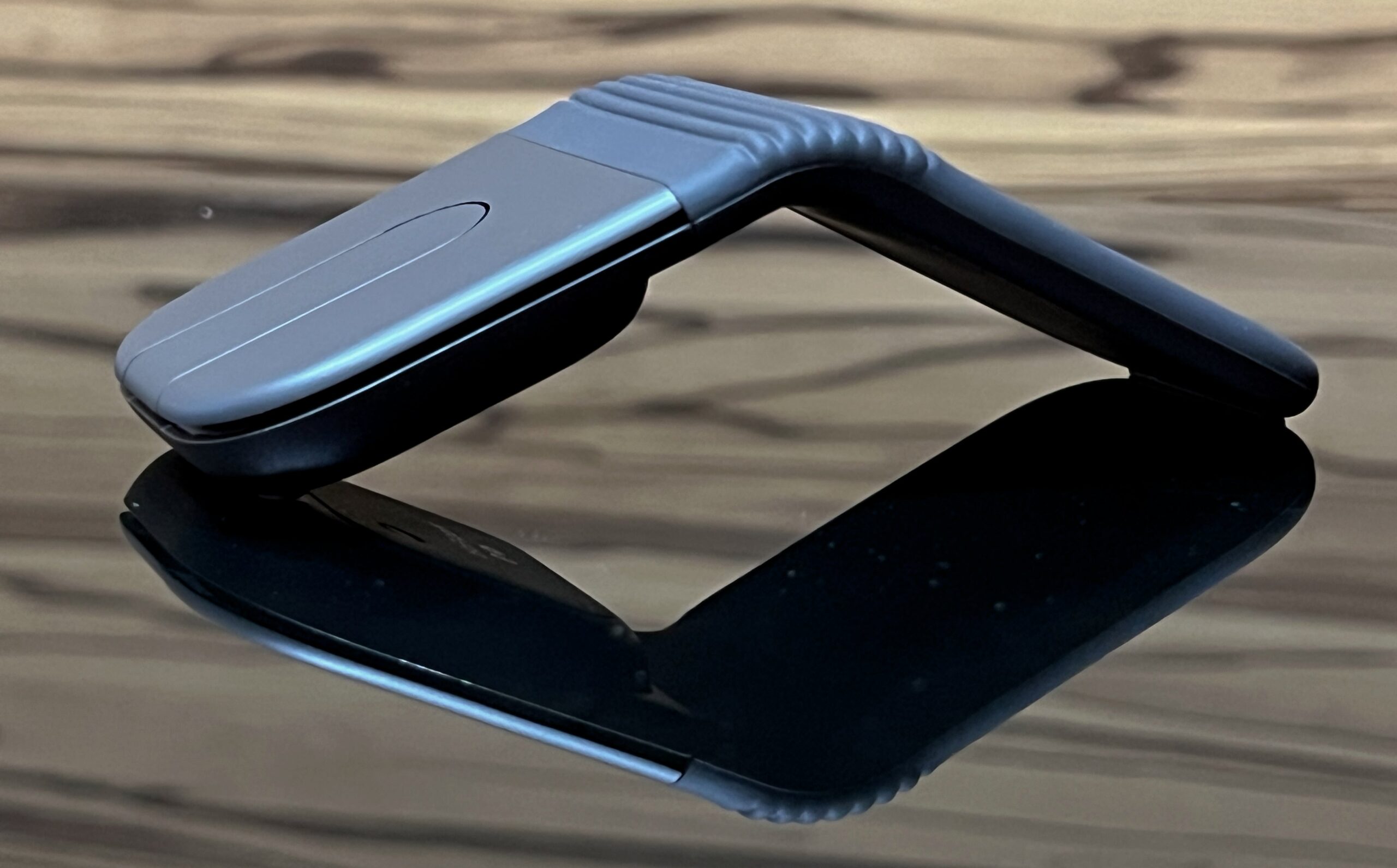
Sixteen years ago, I reviewed the Microsoft Arc Touch Mouse – a device that snapped flat to power off and curved into an arch to power on. In other words, it is a mouse that flattens like a piece of origami to slip into your bag. It was a clever piece of engineering, though its hollow arch offered more novelty than true ergonomic solace.
Fast forward to today, and Logitech is taking its own shot at the foldable mouse with the Mobi Fold. But rather than flattening out into a flexible strip, the Mobi Fold takes inspiration from mini flip phones and clamshells, folding directly in half into a pocketable square. But does folding in half make it a fold-out success, or just a foldable gimmick? Let’s find out.

- Price: S$159, get it at Shopee or Lazada
- Buttons: 4 buttons (Left/Right click, and Forward/Back under Touch Scroll)
- Sensor: 4,000 DPI optical
- Connectivity: Bluetooth
- Weight: 79g
| PROS | CONS |
| Very compact clamshell design that fits anywhere | Expensive |
| Intuitive auto-powering when unfolding/folding | Palm support lacking |
| Whisper-quiet buttons ideal for office use | Touch scroll strip isn’t as smooth or precise as a physical wheel |
| Symmetrical ambidextrous shape for both righties and lefties | |
| Easy multi-device Bluetooth switching |
The Mobi Fold’s headline trick is undoubtedly its folding mechanism. Folded, it measures a tiny 57mm by 66m and sits at only 21mm thick. Weighing in at nearly 80g, it feels negligible in a backpack, a tech pouch, or even the front pocket of your trousers.

Unfolding the mouse automatically powers it on and connects to your device. Snapping it shut turns it off to preserve battery and prevent accidental button presses. Opening and closing the Mobi Fold has a deeply satisfying snap to it that instantly brings back memories of classic flip phones. As a fidget toy, it’s dangerously addictive during dull video calls.
Because the unfolded shape forms a symmetrical tent-like wedge, it works equally well for lefties and righties alike. Wrapped in a smooth, dust-resistant silicone sleeve, the mouse feels surprisingly sturdy. Logitech claims the central hinge has been tested to survive up to 15 years, or 50,000 folds.

Underneath the minimalist exterior lies a capable 4,000 DPI optical sensor that tracks effortlessly across office desks and even dark glass coffee tables. Rather than a traditional physical scroll wheel, Logitech opted for a central touch-sensitive strip – similar to the touch strip on Microsoft’s Arc series.
Swipe up or down to navigate web pages and documents, or press down on the pad for a tactile middle-click. Using the Logi Options+ app, you can tweak scroll sensitivity or reassign the touch strip’s default actions to trigger custom shortcuts (such as Copy/Paste or showing Actions Ring).

While it is reasonably responsive, the touch scrolling will never match the fluid, tactile feedback of Logitech’s MagSpeed physical wheel found on the legendary MX Master series. It works fine for quick browsing, but long spreadsheet marathons can feel slightly less precise.
The Mobi Fold features Logitech’s quiet-click technology, which your office colleagues will be grateful for. The left and right clicks deliver a soft, dampened tactile bump without the loud “clack” that irritates nearby colleagues.
Connectivity is another highlight. With the Easy-Switch button on the underside, you can seamlessly pair and toggle between up to three devices of different platforms (macOS, Windows, iPadOS, ChromeOS, or Android).

On the downside, the Mobi Fold compromises on where almost all travel mice compromise. Because the Mobi Fold prioritises a low profile to enable its fold-in-half design, your palm will mostly hover over the mouse rather than rest on it.
If you have larger hands or rely on a palm grip for all-day comfort, the angular tent shape can lead to mild cramping during extended editing sessions. I feel it is built for 1-to-2-hour bursts of mobile productivity, not as your primary desk mouse.

Not to mention, at S$159, it is rather expensive. Especially when the flagship MX Master 4 (review here) costs only S$40 more. Of course, MX Master 4 doesn’t fold. Also, I don’t know if the Mobi Fold’s silicone surface will be able to withstand Singapore’s humid climate. I have experienced too many peelings of such silicone surfaces on many of my gadgets.
VERDICT: The Logitech Mobi Fold is a masterclass in travel-first peripheral engineering. It takes the legacy of foldable concept pointers and refines it into a sleek, ultra-durable tool that genuinely makes working on small cafe tables or cramped tray tables a breeze.

If you are looking for pure ergonomic comfort, it would still be better served by the Logitech MX Master 4 (my review here). But if your main priority is shaving down bag bulk without sacrificing physical left/right buttons and multi-device agility, the Logitech Mobi Fold unfolds as one of the neatest mice you can buy today.